
One of my clients asked me yesterday how to override DNS responses. This turned out to be quite easy… but only if you know how to do it 😀
Prerequisite:
1) You need to make sure that DNS traffic reaches Zscaler. This means that your DNS server cannot be a private IP address. Set it to e.g. 8.8.8.8.
2) This will not work for explicit proxy forwarding method (e.g. without ZCC). Why? DNS control does not manage this traffic even though Zscaler service edge resolves those requests. Again, we need to see incoming DNS traffic from the client.
Step 1
Create a new URL category with your FQDN. In my case i created the category ‘gazeta‘ which includes the fqdn gazeta.pl
Step 2
Create a DNS control policy with Request Category: <your new category> and Redirect Response field set to <IP address you want to set instead of the normal returned IP>

Here I’m changing the returned IP to 4.3.2.1
Step 3
Activate the change.
Step 4
Verify it’s working as required:
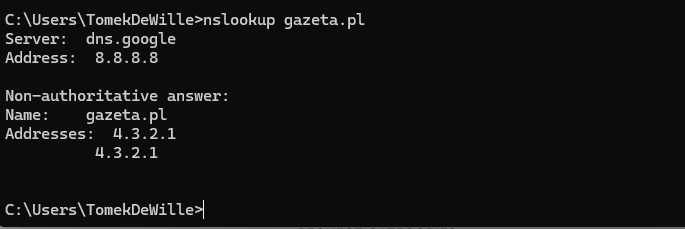
Interestingly enough, I was still able to open the website because in this logic, gazeta.pl is not enough. You need to have http://www.gazeta.pl as well or the logic will not apply.

After I blocked http://www.gazeta.pl, the site won’t open anymore.
What can go wrong here?
Make sure your ipv6 stack is disabled (either via the forwarding profile or manually on your network card).

